
Adipocytes
Introduction to Adipocyte Analysis
Adipocytes, also known as fat cells, are important in many biological studies. The size and number of adipocytes are directly associated with adipose tissue metabolism. Due to their fragile nature and large size, adipocytes have historically been difficult samples with which to work. Because adipocytes store energy, they are used in many metabolism, diabetes, and obesity studies. Additionally, because lipoaspirates are now used as a source of adipose-derived mesenchymal stem cells, separation of immune cells from adipocytes may also be important.
Measuring cell concentration and cell size is often performed manually or by using external software post-microscopy. With a traditional manual hemacytometer method, there is a technical challenge in distinguishing intact adipocytes from lipid droplets generated from ruptured adipocytes in the collagenase digestion process. Available automatic cell counting methods often require complex sample preparation and use of hazardous reagents.
The Cellometer incorporates both total cell counting and fluorescent detection in one easy-to-use instrument. In less than a minute, the system can generate accurate cell counting results and also report cell sizes. Various primary adipocytes, such as human, mice, rat, etc. with diameters of 25um to 250um can be easily loaded into a disposable counting chamber designed especially for adipocytes to eliminate liquid handling reliability issues.
Cellometer Instruments for Performing Adipocyte Measurement
There are three Cellometer instruments that are capable of performing adipocyte measurement: Vision CBA, Auto 2000, and the K2. All three instruments utilize specialized (PD-300) counting chambers to accommodate large cells. The controlled chamber depth eliminates potential problems caused by the buoyancy of adipocytes. Various primary adipocytes, such as human, mice, rat, etc. with diameters of 25 µm to 250 µm can be easily loaded into a disposable counting chamber designed especially for adipocytes to eliminate liquid handling reliability issues. Just 55 µl are needed to load the counting chamber slide. Imaging directly from the counting chamber eliminates the shear stress present in flow-based systems where cells travel through the instrument, making accurate analysis of fragile adipocytes possible.
Simple User-Friendly Procedure
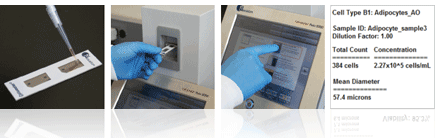
Adipocyte Bright Field Detection and Cell Size Measurement
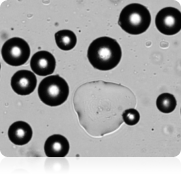
Bright Field Image
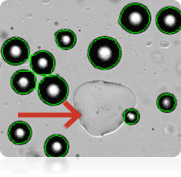
Counted Bright Field Image
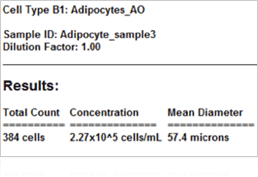
Adipocyte Results
Cell Size Histogram
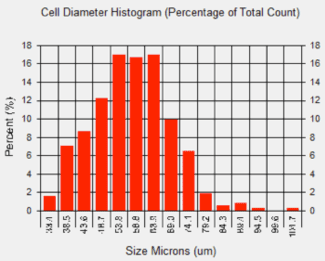
In many studies measuring adipocyte cell size is an important aspect of setting-up baselines or obtaining measurements from downstream experiments, such as looking at the relationship between cell size and energy and glucose metabolism. The images seen above were acquired on the Cellometer Image Cytometer using bright field detection. Image on the topleft is a standard bright field image. The image on the top right is a counted image. The Cellometer image software outlines each counted cell in green. In this image we see that only adipocytes are counted and the lipid droplet (show with an arrow) is not counted. A cell diameter histogram is generated, showing the cell-size distribution of counted adipocytes. After cell counting is completed, the results show the number of cells counted, the concentration, and the mean cell diameter.
Measuring Adipocyte Viability Using Propidium Iodide
Adipocyes Treated with PI
Results Reported by Cellometer
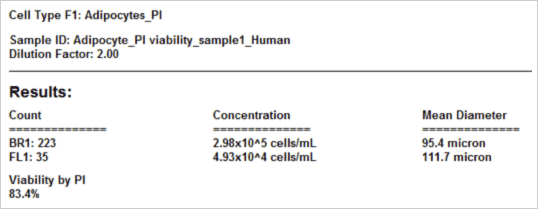
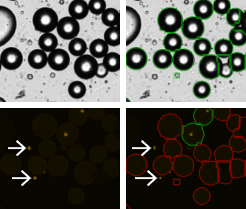
The viability of the collected adicypote sample is crucial for determining the healthiness of the sample. Either for treated or untreated samples, accurate viability measurement could determine how the samples are processed or data is interpreted. Unlike conventional cells, the nucleus in adipocytes is often located on the periphery of the cell. To obtain the percent viability, all the cells are first counted in bright field (green circles). Because PI is a membrane exclusion dye, only the dead PI-stained cells only are counted in the fluorescent image shown with green circles. Live cells, which are PI-negative and are not counted, are shown with the red circles. Furthermore, since free nuclei are not part of whole cells (which we can verify by looking at the bright field image) they are excluded from the dead cell counts (white arrows). As a result, the Cellometer software reports the number of counted Live and Dead cells, the concentration, and the mean cell diameter of each population as well as the percent viability.
Detection of Adipocyte Enzymatic Activity Using Calcein AM
Adipocytes Treated with Calcein AM
Results Reported by Cellometer
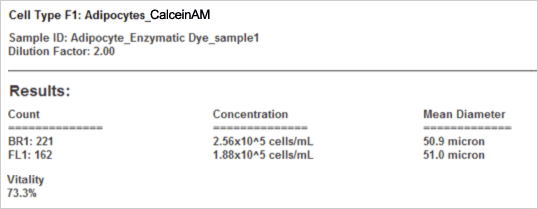
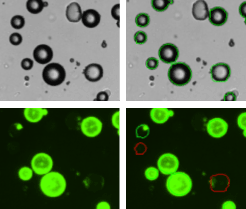
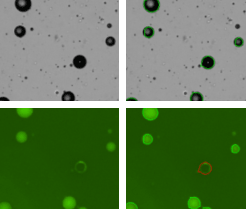
The vitality of the cell sample is measured by staining the cells with Calcein AM. Calcein AM (Calcein acetoxymethyl ester) is a cell permeable, non-fluorescent compound. Upon crossing the cell membrane, Calcein AM is rapidly hydrolyzed by cellular esterases inside live cells. The hydrolysis cleaves the AM group, converting the non-fluorescent Calcein AM to a strongly green fluorescing Calcein. Cells that do not possess active cytoplasmic esterases are unable to convert Calcein AM to Calcein, and therefore do not fluoresce green (red-circles in the fluorescent image). This allows for a quick and easy detection of metabolically-active cells in a sample. Once the counting is complete, the Cellometer software reports the total number of counted cells in bright field and the number of cells that are metabolically active, the concentration, and the mean cell diameter of each population as well as the percent vitality of the sample.
Detection of GFP-labeled Adipocytes
GFP-Labeled Adipocytes
Results Reported by Cellometer
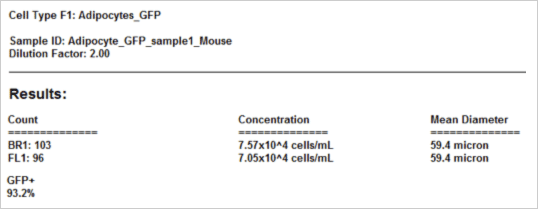
Some laboratories are interested detecting and counting the number of GFP-labeled adipocytes. The strongly green fluorescing cells are detected and counted (green outlined circles) while the weak and non-fluorescing adipocytes are not counted (red outline circles). Once the counting is complete, the Cellometer software reports the total number of counted cells in bright field and the number of cells that are GFP positive, the concentration, the mean cell diameter of each population, as well as the percent of GFP positive cells.
Selected Cellometer Application Literature Review
Stress stimulates production of catecholamines in rat adipocyte
Kvetnansky R, Ukropec J, Laukova M, Manz B1, Pacak K2, Vargovic P
Cellular and Molecular Neurobiology. 2012 July; 32(5): 801-813
Institute of Experimental Endocronology, Slovak Academy of Sciences, Bratislava, Slovak Republic
1LDN Labor Diagnostika Nord, Germany
2National Institute of Child Health and Human Development, NIH, Bethesda, USA
Significance:
In adipose tissues, catecholamines (CAs) play a key role in the regulation of adipose tissue metabolism. The aim of this study was to investigate the effect of different stressors (emotional – immobilization and physical – cold) on CA production in adipocytes. Stromal vascular fraction (SVF) was isolated from mesenteric adipose tissue of rats during stress exposure. In this publication, researchers reported that stress induced CA production in adipocytes, thus suggesting a direct involvement of this novel CA system in the regulation of stress response. The larger overall importance of this research indicates that the stress response in mesenteric adipose tissue was associated with stress-induced adipogenic (fatty tissue production) program, providing a direct link between stress, obesity, and metabolic disease.
Sample Processing:
Mesenteric adipose tissue (200–300 mg) was collected from the rats. After collagenase I digestion (30 min, 37°C, with constant gentle agitation), floating fraction of adipocytes was subsequently washed 4-times with 1.5 ml of medium. Each washing step was followed by centrifugation. The pelleted cells were separated from the floating cell layer by washing and filtering. Floating cell suspension was filtered through 210 μm nylon mesh filter to remove any remaining cell clumps potentially harboring non-adipocyte cells. Fraction of centrifugation pelleted cells separated from adipocytes was considered to be the stromal fraction.
Experimental Design:
Because lipid laden adipocytes float to the top, researchers used this to separate the floating adipocytes from the non-floating cells. They then analyzed the non-floating cells before and after each washing step. Upon collection of the lipoaspirate, the floating fraction of adipocytes was collected and washed. (1st wash) The collected top fraction was washed and spun down. The bottom layer (here called: Infranatant) was analyzed for the presence of immune cell. (2nd wash) The top layer of adipocytes from the 1st wash was collected, washed, and spun down. Again, the bottom layer was analyzed for immune cells. This was done 4 times.
“The purity of adipocyte preparation was monitored by automated histomorphological analysis with Nexelcom, cellometer T4 plus (Nexcelom Bioscience, LLC)”
A
Stromal/vascular fraction (unwashed)
Infranatant after 4th wash of adipocytes
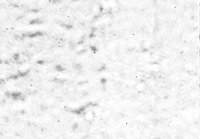
Infranatant after 1st wash of adipocytes
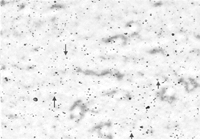
Adipocyte fraction after 4th wash
Results
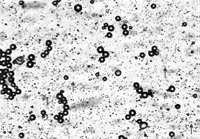
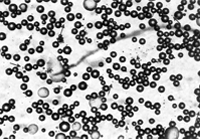
“Results of the automated histomorphological analysis using the Nexelcom, cellometer T4 plus (nexcelom Bioscience, LLC.) This innovative imaging and fluorescence technology allowed to view cell morphology in real time, for visual confirmation after cell counting. Analyses of SVF, washed-out cell population in 1st and 4th wash as well as that of purified adipocyte fraction is shown. Arrows indicate the presence of macrophage-like cells (9–12 µm).”
Adipocyte fraction after 4th wash
Conclusions
Adipocyte analysis using Cellometer image cytometry is ideal for many adipocyte samples. The ability of the instruments to measure the concentration and cell diameter in less than 60 seconds improves, counting efficiency and consistency. Furthermore, the fluorescent capabilities cannot be overlooked. By performing viability and vitality assays researches can be confident in the quality of their sample as well as have the ability to determine the cell condition pre and post treatment. To determine which instrument is best for you contact a specialist.
 Give us a call 978-327-5340. Experienced Nexcelom Applications Specialists are available 8:30am to 5:30pm EST to assist with selection of a Cellometer system.
Publications Using Cellometer for Adipocyte Analysis
- Lee JH, Kirkham JC, Austen WG Jr, et al. (2012) A novel approach to adipocyte analysis. Plastic and reconstructive Surgery 129(2):380-7
- Kvetnansky R, Ukropec J, Vargovic P et al. (2012) Stress stimulates production of catecholamines in rat adipocytes. Cellcular and Molecular Neurobiology 32(5):801-13
- Angle BM, Do RP, Taylor JA, et al. (2013) Metabolic disruption in male mice due to fetal exposure to low butnot high doses of bisphenol A (BPA): Evidence for effects on bodyweight, food intake, adipocytes, leptin, adiponectin, insulin andglucose regulation. Reproductive Toxicology 6238(13)00231-1
Publications Using Cellometer for Research on Adipocyte Cell Fractions
- AA Ismail, S Wagner, H Murua Escobar, et al. (2012) Effects of high-mobility group a protein application on canine adipose-derived mesenchymal stem cells in vitro. Veterinary Medicine International Vol 752083: 1-10
- Kajiya T, Ho C, Kurtz TW, et al. (2011) Molecular and cellular effects of azilsartan: a new generation angiotensin II receptor blocker. Journal of Hypertension 29(12): 2476-83
- Carvalho PP, Gimble JM, Reis RL, et al. (2010) Human Adipose-derived Stromal/Stem Cells: Use of Animal Free Products & Extended Storage at Room Temperature. Semana de Engenharia
- Jingwei L, Kai T, Xiaoyan L, et al. Cellometer cytometry in adipose-derived stem cells in the application of quantitative analysis. (2012) Chinese Journal of Aesthetic and Plastic Surgery 23(3)
- Renzi S, Lombardo T, Dessì SS, et al. (2012) Mesenchymal stromal cell cryopreservation. Biopreservation and Biobanking 10(3): 276-281
- Carvalho PP, Wu X, Gimble JM et al. (2011) Use of animal protein-free products for passaging adherent human adipose-derived stromal/stem cells. Cytotherapy 13(5):594-7
- Guercio A, Di Marco P, Piccione G, et al. (2012) Production of canine mesenchymal stem cells from adipose tissue and their application in dogs with chronic osteoarthritis of the humeroradial joints. Cell Biology International 36(2):189-94